Building AI Apps with Flutter: On-Device Models, Streaming, and Cost-Aware UX
"Add AI to the app" usually means wiring an API key to an LLM endpoint and calling it a feature. That gets a demo working. It does not get you an app that handles being offline, that doesn't bill your Gemini or OpenAI account into the ground on a bad day, or that doesn't make users stare at a spinner for four seconds because the response wasn't streamed. Building an actual AI feature in Flutter means making three decisions deliberately: where inference happens, how the response reaches the UI, and what stops a single feature from becoming your biggest line-item cost.
On-device vs cloud: route by task, not by default
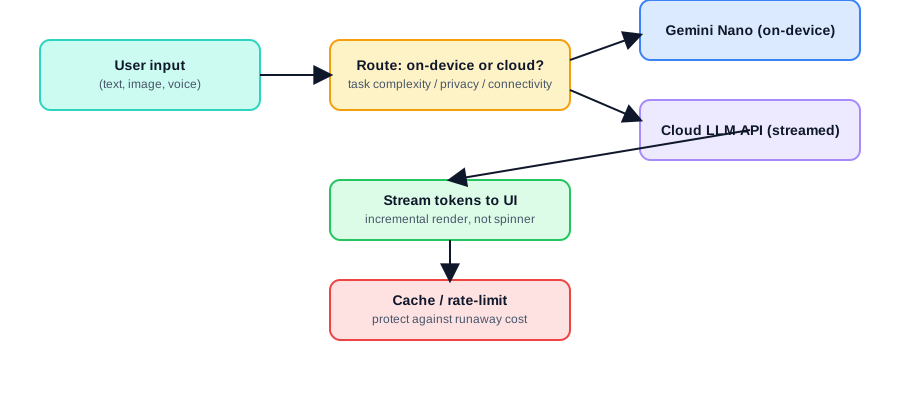
Flutter's AI tooling in 2026 gives you a genuine choice for the first time. On Android, flutter_local_ai and Google's ML Kit GenAI expose Gemini Nano directly through AI Core — an on-device model with zero download step and zero network round-trip, currently available on flagship devices (Pixel 9/10, and several Samsung, Honor, Xiaomi, and OnePlus models). For tasks like summarizing a short piece of text, classifying a message, or extracting structured fields from user input, this is faster, free per-call, works offline, and never sends user data off the device.
import 'package:flutter_local_ai/flutter_local_ai.dart';

final ai = FlutterLocalAi();
final available = await ai.isAvailable(); // checks device support

if (available) {
  final summary = await ai.generateContent(
    prompt: "Summarize this in one sentence: $userText",
  );
}
Cloud LLMs (via Firebase AI Logic, the Gemini Developer API, or a direct OpenAI/Anthropic integration) are still the right call for anything requiring larger context windows, more capable reasoning, multi-turn conversation with memory, or consistency across devices that don't have Gemini Nano available. The mistake is defaulting to cloud for everything — a classification task that could run on-device for free is instead billed per call and adds 300-800ms of network latency for no real benefit.
if (!available || taskNeedsDeepReasoning) {
  final response = await geminiClient.generateContent(prompt);
}
Design the routing decision explicitly — by task type, not as a fallback only when the network is down.
Streaming: the difference between "AI feature" and "AI feature that feels slow"
A non-streamed LLM call means the user watches a spinner for however long the full response takes to generate — often several seconds for anything longer than a sentence. Every major LLM API supports streaming responses token-by-token, and Flutter's Stream type maps onto this naturally:
Stream<String> streamResponse(String prompt) async* {
  final stream = geminiClient.generateContentStream(prompt);
  await for (final chunk in stream) {
    yield chunk.text ?? '';
  }
}

// In the widget:
StreamBuilder<String>(
  stream: streamResponse(prompt),
  builder: (context, snapshot) {
    return Text(accumulatedText + (snapshot.data ?? ''));
  },
)
The perceived latency difference between "text starts appearing in 400ms and keeps flowing" and "nothing happens for 4 seconds, then the full answer appears" is enormous, even when total generation time is identical. If your AI feature doesn't stream, that's the first thing to fix — it costs nothing extra and meaningfully changes how the feature feels.
Cost control is a UX feature, not just a finance concern
LLM API costs scale with token usage in ways that are easy to lose track of during development and expensive to discover in production. A chat feature without a message history cap will send the entire conversation as context on every call — cost growing linearly with conversation length, quietly, until a support ticket about billing surfaces it.
Concrete guardrails worth building in from day one: cap conversation history sent as context (truncate or summarize older turns rather than sending the full transcript every time), cache responses for prompts that repeat across users (an FAQ-style feature answering the same question a thousand times shouldn't hit the API a thousand times), and rate-limit AI feature usage per user the same way you'd rate-limit any other backend resource.
class RateLimitedAiService {
  final Map<String, DateTime> _lastCallByUser = {};
  final Duration cooldown = const Duration(seconds: 3);

  Future<String?> generate(String userId, String prompt) async {
    final last = _lastCallByUser[userId];
    if (last != null && DateTime.now().difference(last) < cooldown) {
      return null; // reject, show "please wait" in UI
    }
    _lastCallByUser[userId] = DateTime.now();
    return await geminiClient.generateContent(prompt);
  }
}
Enforce this server-side, not just client-side — a client-only rate limit is trivially bypassed by anyone calling your backend directly.
Handling failure and offline gracefully
Cloud AI calls fail more often in practice than typical REST calls — rate limits, model overload responses, and timeouts on longer generations are all routine, not exceptional. Design the UI state machine with an explicit failure state and a retry affordance, and fall back to on-device inference (or a cached/canned response) when the network is unavailable rather than presenting a generic error for a feature users expect to "just work."
What actually separates a real AI feature from a demo
Route inference between on-device and cloud based on task complexity and privacy needs, not by hardcoding one and never revisiting it. Stream every response — it's close to free to implement and meaningfully changes perceived speed. And treat token cost as a first-class constraint from the first commit: cap context length, cache repeatable answers, and rate-limit per user server-side. None of this is exotic Flutter or AI knowledge — it's the same production discipline any backend-integrated feature needs, applied to a feature that happens to call an LLM.