Deploying Django on AWS: Elastic Beanstalk vs ECS, and the Config That Trips People Up
Deploying Django to AWS is well-trodden ground, which means most of the pain isn't figuring out which AWS service to use — it's the handful of Django-specific configuration details that work fine locally and break silently in a stateless, load-balanced production environment.
Elastic Beanstalk vs ECS Fargate
Elastic Beanstalk automates EC2 instances, auto-scaling, load balancers, and security groups behind a single deploy command — you hand it a requirements.txt and a WSGI entry point, and it provisions the rest. It's the faster path for a small team that wants AWS-managed infrastructure without writing Dockerfiles or Terraform.
ECS Fargate requires more upfront setup — building a Docker image, pushing it to ECR, defining a task definition — but gives you the exact same container running locally, in staging, and in production, plus first-class support for running one-off tasks (migrations) separately from the request-serving containers. For teams already using Docker in local development, ECS Fargate removes an entire class of "works on my machine" bugs that Elastic Beanstalk's buildpack-based approach can introduce.
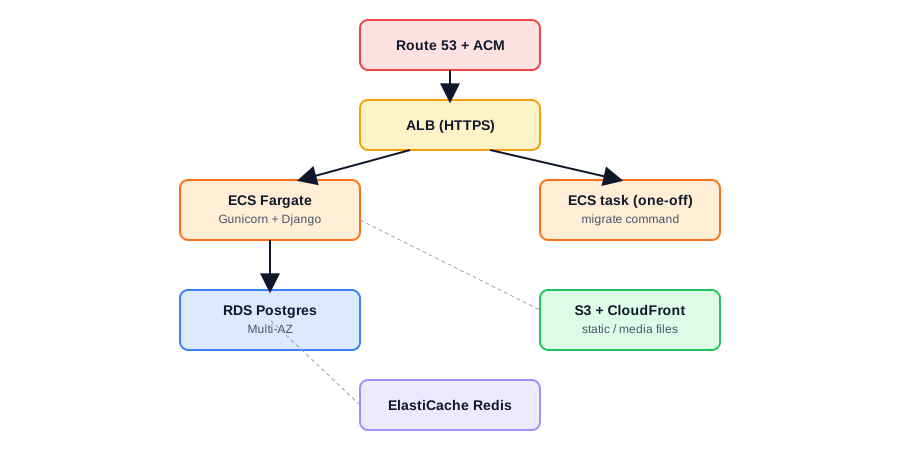
Default to Elastic Beanstalk if your team is small, doesn't already containerize locally, and wants to move fast. Default to ECS Fargate if you're already using Docker, need more than one service (a Django API plus a Celery worker plus a scheduled task), or want infrastructure-as-code control over every piece.
Static and media files: never on the instance
Django's default FileSystemStorage writes to local disk — which disappears the moment Elastic Beanstalk or ECS replaces an instance during a deploy or auto-scaling event. Every production Django deployment on AWS needs static and media files routed to S3:
# settings.py
STORAGES = {
    "default": {
        "BACKEND": "storages.backends.s3.S3Storage",
    },
    "staticfiles": {
        "BACKEND": "storages.backends.s3.S3StaticStorage",
    },
}

AWS_STORAGE_BUCKET_NAME = os.environ["AWS_STORAGE_BUCKET_NAME"]
AWS_S3_REGION_NAME = os.environ["AWS_REGION"]
Put CloudFront in front of the S3 bucket for static assets — it's a meaningful latency improvement for users outside your primary AWS region and offloads repeated requests from S3 directly.
Migrations: run once, not once per container
The most common ECS/container deployment mistake is running python manage.py migrate as part of every container's startup command. With multiple containers starting simultaneously during a deploy, that's a race condition — two containers can attempt the same migration concurrently, and on Postgres this can deadlock or corrupt migration state.
Run migrations as a separate one-off ECS task, triggered explicitly before new containers start serving traffic:
aws ecs run-task \
  --cluster production \
  --task-definition django-migrate \
  --overrides '{"containerOverrides":[{"name":"django","command":["python","manage.py","migrate"]}]}'
Gate the deployment pipeline so the new task set only rolls out after this migration task exits successfully — most CI/CD pipelines (CodePipeline, GitHub Actions with the ECS deploy action) support this as an explicit step.
Settings that break in production but not locally
ALLOWED_HOSTS needs the load balancer's domain, not just localhost — a Django app behind an ALB that doesn't know its own host header returns a 400 on every request until this is fixed. DEBUG = False in production is mandatory not just for security but because Django's debug error pages leak settings, installed apps, and stack traces to anyone who triggers a 500.
ALLOWED_HOSTS = os.environ.get("ALLOWED_HOSTS", "").split(",")
DEBUG = os.environ.get("DEBUG", "False") == "True"
SECURE_PROXY_SSL_HEADER = ("HTTP_X_FORWARDED_PROTO", "https")
SECURE_PROXY_SSL_HEADER matters specifically because the ALB terminates TLS and forwards plain HTTP to your containers — without telling Django to trust the X-Forwarded-Proto header, Django thinks every request is insecure and request.is_secure() returns False even behind HTTPS, breaking secure cookies and CSRF.
Database: RDS, connection pooling, and Multi-AZ
Use RDS Postgres with Multi-AZ enabled for anything serving real traffic — it gives you automatic failover to a standby replica during an AZ outage or maintenance window, at roughly double the compute cost of a single instance, which is a reasonable trade for anything customer-facing.
Django's default connection handling opens a new database connection per request unless you configure CONN_MAX_AGE, which is expensive under load:
DATABASES = {
    "default": {
        "ENGINE": "django.db.backends.postgresql",
        "CONN_MAX_AGE": 60,
        # ...
    }
}
For high-concurrency workloads, put RDS Proxy or PgBouncer in front of Postgres — connection limits on RDS instances are lower than most people expect, and a traffic spike with connection-per-request behavior can exhaust them well before compute becomes the bottleneck.
Background workers and scheduled tasks
Celery workers run as their own ECS service (or Elastic Beanstalk worker environment) separate from the web-facing containers, sized independently since worker load rarely correlates with web request volume. Use ElastiCache Redis as the broker rather than running Redis on an EC2 instance yourself — it removes an entire category of "who's patching this box" operational overhead.
The deployment checklist
Static and media files on S3, never local disk. Migrations run as a single gated task, not embedded in container startup. ALLOWED_HOSTS and SECURE_PROXY_SSL_HEADER configured for the load balancer. RDS with Multi-AZ and CONN_MAX_AGE set. Celery on its own service with Redis in ElastiCache. None of this is exotic AWS knowledge — it's the difference between a Django app that survives its first real deploy under load and one that returns 400s the moment traffic hits the load balancer.