Deep Dive: Flutter BLE Background Services and GATT Command Queuing
When building production-grade Internet of Things (IoT) applications, user expectations are high: they want their smart wearable, glucose monitor, or industrial sensor to sync data seamlessly even if the app is in the background, the screen is locked, or the phone is in their pocket.
By default, Flutter apps suspend execution when minimized. Furthermore, Bluetooth Low Energy (BLE) APIs are notoriously stateful and delicate. Attempting to write multiple GATT characteristics simultaneously or without waiting for responses results in write collisions and silent failures.
To build a reliable BLE integration, you must solve two major challenges:
- Background Lifecycles: Keeping the BLE connection active and processing streams in a separate thread (Isolate) or OS service.
- GATT Command Queuing: Restricting BLE operations to execute in a strict, sequential queue.
The Architecture: Multi-Isolate BLE Service
To run code when the app is minimized, we separate the UI logic from the Bluetooth communication. We instantiate a Background Isolate that handles all Bluetooth scanning, connections, and streaming, communicating with the main thread via SendPort and ReceivePort.
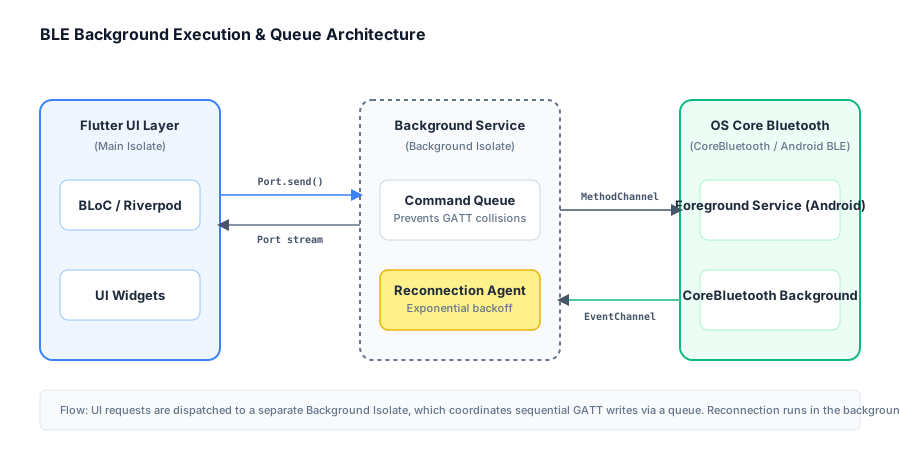
On Android, this isolate is backed by a native Foreground Service to prevent the OS from killing the process. On iOS, we configure CoreBluetooth Background Modes (bluetooth-central).
Spawning the Background Isolate
Here is how to set up the background communication channel using Dart isolates:
import 'dart:isolate';
import 'dart:async';

class BleBackgroundManager {
  SendPort? _toBackgroundPort;
  final ReceivePort _fromBackgroundPort = ReceivePort();

  Future<void> initializeService() async {
    // Spawn the background worker isolate
    await Isolate.spawn(_backgroundEntrypoint, _fromBackgroundPort.sendPort);

    _fromBackgroundPort.listen((message) {
      if (message is SendPort) {
        _toBackgroundPort = message;
        print("Communication channel established!");
      } else {
        _handleBackgroundMessage(message);
      }
    });
  }

  static void _backgroundEntrypoint(SendPort toMainPort) {
    final receivePort = ReceivePort();
    toMainPort.send(receivePort.sendPort);

    // Initialize BLE client inside background isolate
    final bleQueue = GattCommandQueue();

    receivePort.listen((message) {
      if (message is Map<String, dynamic>) {
        final command = message['command'];
        final payload = message['payload'];
        bleQueue.add(command, payload);
      }
    });
  }

  void sendCommand(String command, dynamic payload) {
    _toBackgroundPort?.send({'command': command, 'payload': payload});
  }

  void _handleBackgroundMessage(dynamic message) {
    // Dispatch received telemetry data to BLoC or Riverpod
    print("Received from background BLE isolate: $message");
  }
}
Solving the GATT Collision: Implementing a Command Queue
A common mistake in BLE development is triggering write commands concurrently from different components in the UI. A Bluetooth peripheral can typically process only one write or read operation at a time. If you execute a second write before the device returns an acknowledgment for the first, the peripheral or the native Bluetooth stack will reject it.
We solve this by designing a FIFO (First-In, First-Out) queue.
class GattCommand {
  final String id;
  final Future<void> Function() execution;
  final Completer<void> completer = Completer<void>();

  GattCommand(this.id, this.execution);
}

class GattCommandQueue {
  final List<GattCommand> _queue = [];
  bool _isProcessing = false;

  void add(String id, Future<void> Function() execution) {
    final command = GattCommand(id, execution);
    _queue.add(command);
    _processNext();
  }

  Future<void> _processNext() async {
    if (_isProcessing || _queue.isEmpty) return;
    _isProcessing = true;

    final nextCommand = _queue.removeAt(0);
    try {
      print("Executing GATT Command: ${nextCommand.id}");
      // Run the actual BLE read/write logic
      await nextCommand.execution().timeout(const Duration(seconds: 5));
      nextCommand.completer.complete();
    } catch (e) {
      print("Error executing ${nextCommand.id}: $e");
      nextCommand.completer.completeError(e);
    } finally {
      _isProcessing = false;
      // Recurse to process next items in queue
      _processNext();
    }
  }
}
This ensures that even if a user taps five buttons rapidly, the commands are serialized and sent one-by-one, preventing GATT collisions entirely.
Handling OS Limits: Background Configurations
Android: Foreground Services
Android requires a foreground service with notification support to perform scans and keep connections alive in the background. In your AndroidManifest.xml, make sure to declare the service:
<service
    android:name="com.pravera.flutter_foreground_task.models.ForegroundTaskService"
    android:foregroundServiceType="connectedDevice"
    android:exported="false" />
We specify connectedDevice which is the official service type required for Bluetooth connectivity.
iOS: Background CoreBluetooth
For iOS, select your target in Xcode and enable Background Modes, checking Uses Bluetooth LE accessories (which adds bluetooth-central to UIBackgroundModes in your Info.plist):
<key>UIBackgroundModes</key>
<array>
  <string>bluetooth-central</string>
</array>
<key>NSBluetoothAlwaysUsageDescription</key>
<string>We need background bluetooth access to sync your health sensor data.</string>
When iOS wakes up your app in the background to handle Bluetooth events, it gives your app a short execution window. By keeping the communication isolated inside a background isolate and routing data directly to SQLite/Supabase or local cache, you minimize UI overhead and prevent the OS from killing the app due to CPU/memory spikes.
Summary
Robust BLE integrations require moving away from the UI thread. By isolating BLE activities in a background isolate, running a native foreground service, and routing all GATT interactions through a single FIFO command queue, you ensure that your Flutter app remains responsive, stable, and capable of processing real-world IoT telemetry under all conditions.