The Flutter BLE Guide: Scanning, Connecting, and Streaming From Real Devices
Bluetooth Low Energy is where a lot of Flutter tutorials quietly stop being tutorials and start being a fight with platform channels, stale device caches, and Android permission dialogs that behave differently across OEMs. This guide covers what actually matters when you're pairing a Flutter app with a real BLE peripheral — a heart-rate strap, a glucose meter, a smart lock, an IoT sensor — not just the demo where two emulators talk to each other.
Picking a package
Three libraries dominate the Flutter BLE space: flutter_blue_plus, flutter_reactive_ble, and Polidea's flutter_ble_lib. flutter_reactive_ble is the safer default for production apps needing multi-device support on both Android and iOS — it wraps the connection lifecycle in a reactive stream API that maps cleanly onto Bloc or Riverpod, and it's maintained with production use in mind rather than as a side project. flutter_blue_plus is actively developed and has a larger community, but historically its API has shifted between versions in ways that break existing integrations, so pin your version and read the changelog before upgrading.
dependencies:
  flutter_reactive_ble: ^5.4.0
The connection lifecycle
BLE isn't request/response — it's a state machine, and treating it as anything else is where most BLE bugs come from.
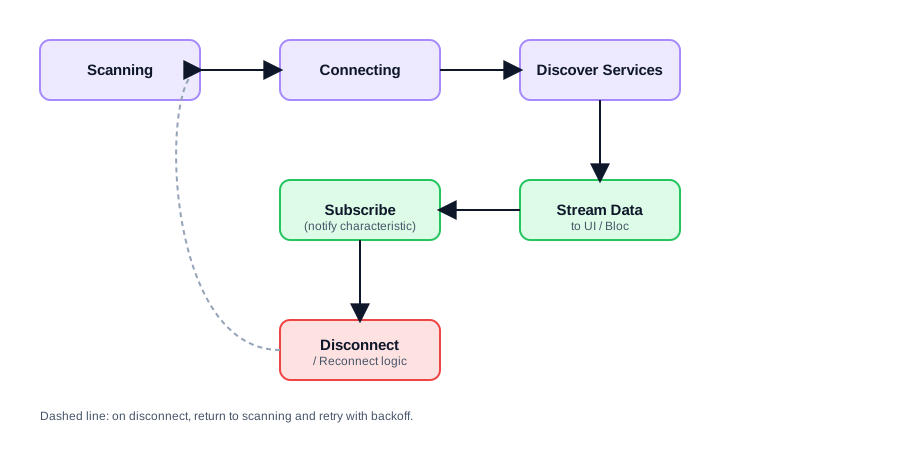
Scanning discovers devices advertising nearby. Connecting opens a GATT connection to a specific device by ID. Discovering services enumerates the characteristics that device exposes. Subscribing to a notify characteristic is how you receive a stream of values — heart rate, sensor readings, whatever the peripheral is built to send — without polling. And disconnects will happen: out of range, low battery, OS killing background connections. Your app needs an explicit path back to scanning, not a crash.
final flutterReactiveBle = FlutterReactiveBle();

Stream<DiscoveredDevice> scanForDevices() {
  return flutterReactiveBle.scanForDevices(
    withServices: [Uuid.parse('0000180d-0000-1000-8000-00805f9b34fb')],
    scanMode: ScanMode.lowLatency,
  );
}

Stream<ConnectionStateUpdate> connectToDevice(String deviceId) {
  return flutterReactiveBle.connectToDevice(
    id: deviceId,
    connectionTimeout: const Duration(seconds: 10),
  );
}
Once connected, subscribe to the characteristic you care about:
final characteristic = QualifiedCharacteristic(
  serviceId: Uuid.parse('0000180d-0000-1000-8000-00805f9b34fb'),
  characteristicId: Uuid.parse('00002a37-0000-1000-8000-00805f9b34fb'),
  deviceId: deviceId,
);

flutterReactiveBle.subscribeToCharacteristic(characteristic).listen(
  (data) {
    final heartRate = data[1]; // parse per the device's data format
    heartRateController.add(heartRate);
  },
  onError: (error) => reconnect(deviceId),
);
Permissions: where most first attempts fail
Android 12+ (API 31+) split Bluetooth permissions into BLUETOOTH_SCAN, BLUETOOTH_CONNECT, and BLUETOOTH_ADVERTISE, and scanning still requires location permission on many devices because BLE scan results can be used to infer location. Missing this is the single most common reason a BLE feature works on one test phone and silently returns zero devices on another.
<uses-permission android:name="android.permission.BLUETOOTH_SCAN" android:usesPermissionFlags="neverForLocation" />
<uses-permission android:name="android.permission.BLUETOOTH_CONNECT" />
<uses-permission android:name="android.permission.ACCESS_FINE_LOCATION" android:maxSdkVersion="30" />
On iOS, NSBluetoothAlwaysUsageDescription in Info.plist is mandatory, and the permission prompt only appears the first time you actually start a scan — not at app launch — so test the real user flow, not just a permissions check in isolation.
Use permission_handler to check and request these explicitly before calling scanForDevices, and treat "permission denied" as a first-class UI state, not an exception you catch and ignore.
Reconnection logic you can't skip
Real BLE hardware disconnects constantly — walking out of range, a phone lock screen suspending background scanning, a firmware reset. A production BLE feature needs an explicit retry strategy with backoff, not a bare connectToDevice call:
StreamSubscription<ConnectionStateUpdate>? _connectionSubscription;
int _retryCount = 0;

void connectWithRetry(String deviceId) {
  _connectionSubscription = connectToDevice(deviceId).listen(
    (update) {
      if (update.connectionState == DeviceConnectionState.connected) {
        _retryCount = 0;
      }
      if (update.connectionState == DeviceConnectionState.disconnected) {
        final delay = Duration(seconds: (2 * (_retryCount + 1)).clamp(2, 30));
        _retryCount++;
        Future.delayed(delay, () => connectWithRetry(deviceId));
      }
    },
  );
}
Testing without hardware on hand
You will not always have the physical device next to you. Wrap your BLE client behind an interface (this is where Clean Architecture's repository pattern earns its keep — see the companion article on Flutter Clean Architecture) so you can inject a fake data source that emits synthetic characteristic values for UI development and widget tests, and only swap in the real flutter_reactive_ble client for on-device QA.
The parts tutorials skip
Characteristic values arrive as raw bytes, and every device manufacturer has its own encoding — check the device's GATT specification sheet rather than guessing byte offsets. iOS background BLE has hard restrictions: your app can maintain a connection in the background but cannot scan for new devices unless the peripheral is already known. And MTU size defaults to 23 bytes on many Android devices unless you explicitly negotiate a larger one with requestMtu, which matters the moment you're streaming anything larger than a heartbeat value.
BLE in Flutter is very doable, it just isn't a REST call. Model it as the state machine it actually is, handle permissions as an explicit UI flow, and write the reconnect logic before you ship — not after the first field report of "the app just stops updating."