Flutter Performance Optimization: Finding and Fixing Jank Before Users Notice
Flutter's rendering pipeline is fast by default, which is exactly why performance problems in Flutter apps tend to be self-inflicted rather than framework limitations. A widget rebuilding every frame when it doesn't need to, an Opacity widget wrapping something that changes constantly, an unbounded ListView loading every item at once — these are the actual causes behind the vast majority of "Flutter feels janky" reports, and every one of them is fixable once you know where to look.
Understanding the pipeline before you optimize it
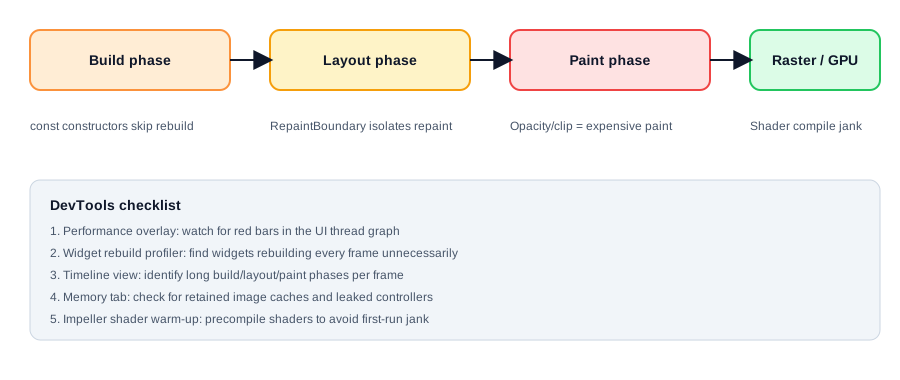
Every frame moves through build, layout, paint, and rasterization. Build is where Dart code runs to produce a widget tree. Layout determines size and position. Paint records drawing instructions. Rasterization (via the Impeller engine on modern Flutter) turns those instructions into pixels on the GPU. A slow frame is a symptom — the diagnosis is figuring out which of these four phases is actually taking too long, and DevTools' Performance view breaks frame time down by exactly this.
Rebuild storms: the most common cause
The single highest-impact fix in most Flutter apps is eliminating unnecessary rebuilds. setState() called on a widget high in the tree rebuilds everything beneath it unless those subtrees are const or extracted into their own widgets.
// Bad: entire ListView rebuilds every time counter changes
class BadExample extends StatefulWidget {
  @override
  State<BadExample> createState() => _BadExampleState();
}

class _BadExampleState extends State<BadExample> {
  int counter = 0;

  @override
  Widget build(BuildContext context) {
    return Column(
      children: [
        Text('$counter'),
        ExpensiveWidgetTree(), // rebuilds every time counter changes
      ],
    );
  }
}

// Better: const isolates the subtree from the rebuild
Column(
  children: [
    Text('$counter'),
    const ExpensiveWidgetTree(), // const = Flutter skips rebuilding it
  ],
)
With Bloc or Riverpod, scope your BlocBuilder/Consumer as narrowly as possible instead of wrapping large widget trees — a BlocBuilder around your entire screen rebuilds the entire screen on every state emission, even if only a small part of it actually changed.
DevTools' "Track widget rebuilds" option in the Performance view shows exactly which widgets rebuild on each frame — turn it on before guessing at fixes.
Expensive paint operations
Opacity, ClipRRect, and BackdropFilter all force Flutter to render their child to an offscreen buffer before compositing, which is meaningfully more expensive than a normal paint. Animating opacity on a complex widget tree every frame is a common cause of dropped frames that looks fine in a static screenshot and terrible in motion.
// Expensive: animates Opacity on a complex tree every frame
AnimatedOpacity(
  opacity: visible ? 1.0 : 0.0,
  duration: Duration(milliseconds: 300),
  child: ComplexCard(),
)

// Better: use AnimatedSwitcher with a FadeTransition, or
// wrap the specific expensive child in a RepaintBoundary
RepaintBoundary(
  child: AnimatedOpacity(
    opacity: visible ? 1.0 : 0.0,
    duration: Duration(milliseconds: 300),
    child: ComplexCard(),
  ),
)
RepaintBoundary isolates a subtree into its own compositing layer, so it repaints independently instead of forcing everything around it to repaint too. Use it around anything that animates independently of its siblings — but don't wrap everything in one reflexively, since each boundary has its own (small) memory cost.
Lists: never build what isn't visible
ListView(children: [...]) builds every child eagerly, which is fine for 10 items and a serious problem for 1,000. ListView.builder builds items lazily as they scroll into view:
ListView.builder(
  itemCount: items.length,
  itemBuilder: (context, index) => ItemTile(item: items[index]),
)
For lists mixing many different item types, ListView.builder alone isn't enough if the item widgets themselves are heavy — combine it with AutomaticKeepAliveClientMixin deliberately (not by default) and cache expensive computations (like image decoding) outside the build method.
Images: the silent memory hog
Loading a 4000x3000 photo into a 200x200 thumbnail without resizing decodes the full image into memory before Flutter ever shrinks it on screen. This is one of the most common causes of memory pressure and jank when scrolling through image-heavy lists.
Image.network(
  url,
  cacheWidth: 200, // decode at display size, not source size
  cacheHeight: 200,
)cacheWidth/cacheHeight tell Flutter's image cache to decode at the target resolution instead of full source resolution — this alone can cut memory usage by an order of magnitude on photo-heavy screens.
Shader compilation jank
The first time a new visual effect (a particular gradient, shadow, or blend mode) is used, Impeller has to compile a shader for it — and that compilation happening mid-scroll is a visible stutter, even on an otherwise well-optimized screen. Flutter's shader warm-up mechanism precompiles shaders used by your app during a splash screen or app startup instead of on first use:
flutter run --profile --cache-sksl
# after profiling representative usage:
flutter build apk --bundle-sksl-path flutter_01.sksl.json
This is specifically worth doing before a release if your app has custom animations, gradients, or shadows that a user might trigger for the first time mid-interaction.
The actual workflow
Turn on the Performance overlay first — red bars in the UI or raster thread graph tell you which side of the pipeline is slow. Use the widget rebuild tracker to find rebuild storms before touching anything else, since that's the highest-frequency cause. Then look for Opacity/ClipRRect/BackdropFilter used inside anything that animates, oversized images loaded without cacheWidth, and unbounded lists not using .builder. Fix in that order, and re-measure after each change — performance work without measurement is just guessing with extra steps.